
 I have a ever growing iTunes library, but sometimes when importing stuff, the ID3 tags go all wrong, or in the in Japanese/Non-English Characters. So like many geeks I hate having to mess with each ID3 tag individualy even if iTunes makes it easy. Solution CDDB and a little script from dougscripts.co. You simply go to the playlist, run the first script which searches CDDB to find the album your playing, then you run the second script that then copies the page details and puts them in your ID3 tags. Voila! your library is nice and perfectly formed.
Switch To Something Other than IE

Devthought – Guillermo Rauch’s Blog » IE7 still creating problems for developers?
5 Reasons to switch from IE to something else:
- Its Horrible confusing and counter-intuitive (in versions 5 – 7)
- Its unSafe See Here
- It causes headaches on a monumental scale, I only play with web design its not a serious job and it give me headaches I can only imagine what it does to the poor developers that design sites for a living.
- Pop-Ups – whilst installing Google’s toolbar and using pop-up blockers built into the latest version IE its still not good enough, with a couple of firefox extensions you can block anything you don’t want easily and you can even stop the annoying “Zap Me!” ads
- This is the simplest of all the reasons, its made by Microsoft and therefore supports there own proprietary software and activex controls, which should really be named entry points for spyware and nasty painfully hard to remove software that you simply don’t want
Simply put switch and make your life more productive and Kill Off Bills Browser
Its Official the RIAA is the Worst Company in America
The RIAA won The Consumerist’s “Worst Company In America 2007” reader poll.We predicted an RIAA landlslide, but they only managed a 53.8% majority over Halliburton’s 46.2%
RIAA Wins Worst Company In America 2007 – Consumerist
No Surprises here folks, apart from the fact the RIAA will never acknowledge they are the least liked company in america for 2007. And I can only wonder why (note slight hint of sarcasm)
Piracy: The Loss of Objectivity and Intelligence
“Unfortunately, many schools have turned a blind eye to piracy,” Berman said. “I don’t doubt that there are legitimate issues that universities must grapple with, including privacy and cost concerns. However, when a university such as Purdue tells the AP that it rarely even notifies students accused by the RIAA because it is too much trouble to track down alleged offenders—such inaction is unacceptable.”Congressman Hollywood: Universities a wretched hive of scum and villainy
This is what happens when a person in power, brains’ get turned to jelly and is spat out by the cat. It never occurs to these people funding researching and going around screaming disaster and catastrophe from the hill tops, to actually look what is right in front of them.
The Music/Movie Industries is Inherently, poor at adapting
So what exactly does this mean well its quite simple. When Napster came along the Music industry looked at it and said “We still good it will all blow over in a couple of months” Then a couple of months later they had a problem. The same goes for the Movie industry. They are arrogant enough to dimiss a technology that will quite clearly effect them in the money making department and try to place the sole blame on the cosumer. The consumers pay them money in the first Place
Solve not Sue
Anyone with a slight business interlect and brain cell(s) would look at the current situation within the Music/Movie industry and start working on solutions, put the money were it is well spent. The industry will never change the habits of the youth of today, they have spent to long in the courts increasing the resentment for that. They need to start working to give the consumer product they want in the form they want, this by no means free.
The idea that forcing your consumers to do something because the man companies say it should be is completly stupid and cause more illegal downloading, just so you as a consumer feel happy your pissing the said companies off. Everybody knows that downloading music and not paying for it is wrong, but when the labels offer no better alternatives, what else are your options.
The Other Options
iTunes Store, has a big market share and a big catalog of major labels and indie music, look deeply at the Store and you see just what a miracle it is, its there, and in the same moment why it doesn’t give what a p2p client gives. The simple matter of choice is what it now starts to boil down to, what could be classed as the catalyst to this whole thing in the first place.
People want choice they want to choose how they consume media and where, iTunes limits you to the iPod and your PC/Mac, there is a simple solution get rid of DRM and completely and open the whole thing up, and I would never illegally download again.
However, there is one place that iTunes excells at apart from providing a seamless UI experience. Our friend the Longtail, p2p only really is a good distribution system for popular tracks, when you get to less popular tracks you quickly find nobody sharing things.
To cut a long story short we need a solution, that the consumer is happy with and we need it fast else we could see everybody going down to court.
Less DRM is Good…
 Whether you believe that it was an elaborate publicity stunt or actually Steve Jobs own hand that wrote the “Thoughts on Music” there is one important feature that we all need to take action upon.
The third alternative is to abolish DRMs entirely. Imagine a world where every online store sells DRM-free music encoded in open licensable formats. In such a world, any player can play music purchased from any store, and any store can sell music which is playable on all players. This is clearly the best alternative for consumers, and Apple would embrace it in a heartbeat. If the big four music companies would license Apple their music without the requirement that it be protected with a DRM, we would switch to selling only DRM-free music on our iTunes store. Every iPod ever made will play this DRM-free music.
Lets see if the people of the internets will prevail and get rid of DRM, or at the very least start the removal process. Sign the Defective Design Letter Here
Microsoft Does it again…
A Vista ad i saw at Microcenter, I just thought it was kind of funny that they decided to use a mac in the ad.
Its obviously a stock image but you would think Microsoft with a marketing budget that could dwarf Dells would spend a little money in getting images of laptops that actually Run Vista, and Bill Gates has once again shot himself in the foot with this along with the fact Vista is now cracked the suposably most secure operating system windows has ever made…
StudyUSA.co.uk Coming Soon
 As you may know, I am seriously looking at going to University in the USA (quite why I aren’t sure)
When I have been looking around the net for information and how things in the US differ from here in the UK, I got fustrated. There loads of information lots of it very useful to the international student but its buried, hidden or just in obscure places of the internets and theres no filter and central resource for all this infromation.
Whats a Geek to do?
Well its quite simple really by a domain and make a new website combining all this information into something useful and incredibly help to international students just like me. Who ever said I was selfish?
The basic idea is for a wiki like site were people can come and submit things and also a huge list of links and information, to help you and me make the right choices. The sites not about taking all the credit for all the information thats out there it providing a place were all the information comes together so its easy to access what you want.
I should have the site ready by the end of the week and ready for content, which looks like it may just be me in the beginning but I hope to make a community out of the project if it all works.
Podcast Replace Classrooms?
In the beginning, the iPod let you listen to every CD you owned, even when you were stuck on the Red Line. Then Steve Jobs said, “Let there be video,” and lo and behold, you could watch “Lost” die a slow, overwritten death on a two-inch screen. But while people seem content to load their little devices with as many songs and TV shows as possible, podcasts (think of them as radio programs that you download) tend to be neglected.
Listen and Learn With Podcasts – washingtonpost.com


The Answer = Not anytime soon
Why? it all falls down to the mentality of the person learning and the fact that listening to a podcast is a passive occupation, were as good learning will always be active.
Increasing technology use within schools, colleges and university’s can do nothing but help the way we learn and consume that learning materials. Being able to access course materials 24/7 is a great resource to have but you don’t remember the stuff you do aswell as you would from a classroom.
I think there will inevitably be some invention that takes podcasting and vidcasting out of the passive domain into the interactive and maybe then we can consider replacing the classroom. Until then I think classrooms are safe.
How the JT Blob was made.
 As you can see from the new design, the blob is taking more of a centre stage. So how did I come up with the idea? and how did I make it.
Designing in general can seem complicated and daunting but with just a few photoshop techniques in your toolbox. You can create a logo for you in a couple of hours or less.
You start with a blank sheet
Like all good things its best to start with no computer, a soft pencil, rubber and blank sheet of paper will do. Start by just randomly sketching something and then start working that into a logo (say you initials for example) You can spend as long as you like making this drawing look something like how you want it, but it doesn’t have to be very neat.
Say Cheese
Next step take a photo of your design (or scan it) I tried drawing my logo free hand straight on the my fantastic Wacom Intuos3 tablet, but it never looked right. This way works best for those of us who aren’t 100% confident with the graphics tablet. 
Follow the Yellow Brick Road
 Now for the slightly more complicated bit, open up your photo in photoshop and start using the pen tool, to trace over your logo. You can find a fantastic tutorial on the pen tool over on PixelPerfect
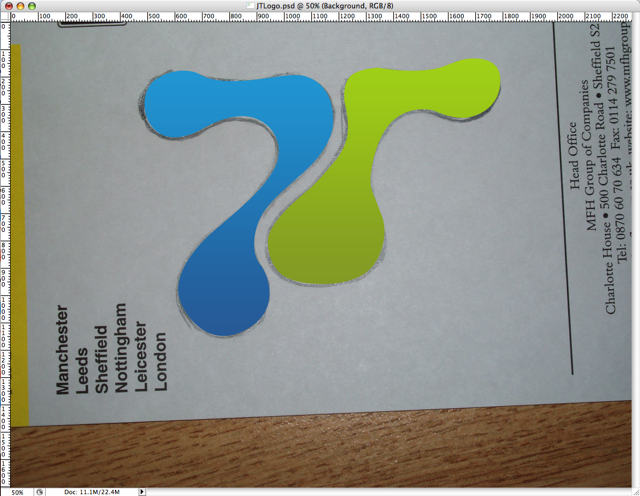 You can then continue and play with the path till its perfect (this is why you pencil drawing didn’t need to be perfect)Then fill the path with a gradient by creating a gradient layer and using the path to mask it. Repeat this process until all elements of your logo.
Add a bit of text and you have yourself a logo. Its not that difficult, really. The harder part is making your website match your logo.
The Quantum Age is upon us.
 Engadget Story
If you’ve read my earlier posts on quantum computers and artilects, you may have thought “Thats all very interesting but its not gonna happen in my lifetime” well you’d be wrong. You can now pick up from D-Wave a 16-Qubit computer.
While its not quite upto the standard of Andromeda‘ we’re getting closer.